iConnect for universities

iConnect

The online classroom that teaches back.

Upload your slides. Your students get a lesson book, a live quiz and a tutor that knows only your material.

PDFPowerPointWordBachelorMasterDoctoral

GoinLabs iConnect turns your own PDF, PowerPoint or Word file into an interactive lesson, checks understanding live during the class, and lets students ask the material questions afterwards, while you see what the class did not understand.

The problem

Online teaching is still one-way.

Slides stay passive

Students watch. The material does not answer back.

You can’t see who is lost

Behind small video tiles, confusion stays hidden, often until the exam.

Too many tools

One online class needs a video app, slides, a quiz tool, a translator and file sharing.

Video appSlidesQuiz toolTranslatorFile sharing
One room: iConnect
How it works

From your slides to a living lesson.

1

Upload your material

A PDF, PowerPoint with speaker notes, or Word file. Choose the subject, the students, the length and the language.

2

Teach with the book

In about a minute the AI builds a study unit from your file only: the material, key terms, a self-test and a case to apply it.

3

Check understanding live

Send a quick quiz. Answers arrive on your board while you teach.

4

Let the material answer back

Students ask questions after class. You see what they did not get, before the exam.

See it in action · iConnect 3.37

Five things your students will notice in the first class.

Real screenshots from iConnect. Pick a topic, flip through the pictures and open any of them full screen.

From my material

Your lecture, turned into a lesson book.

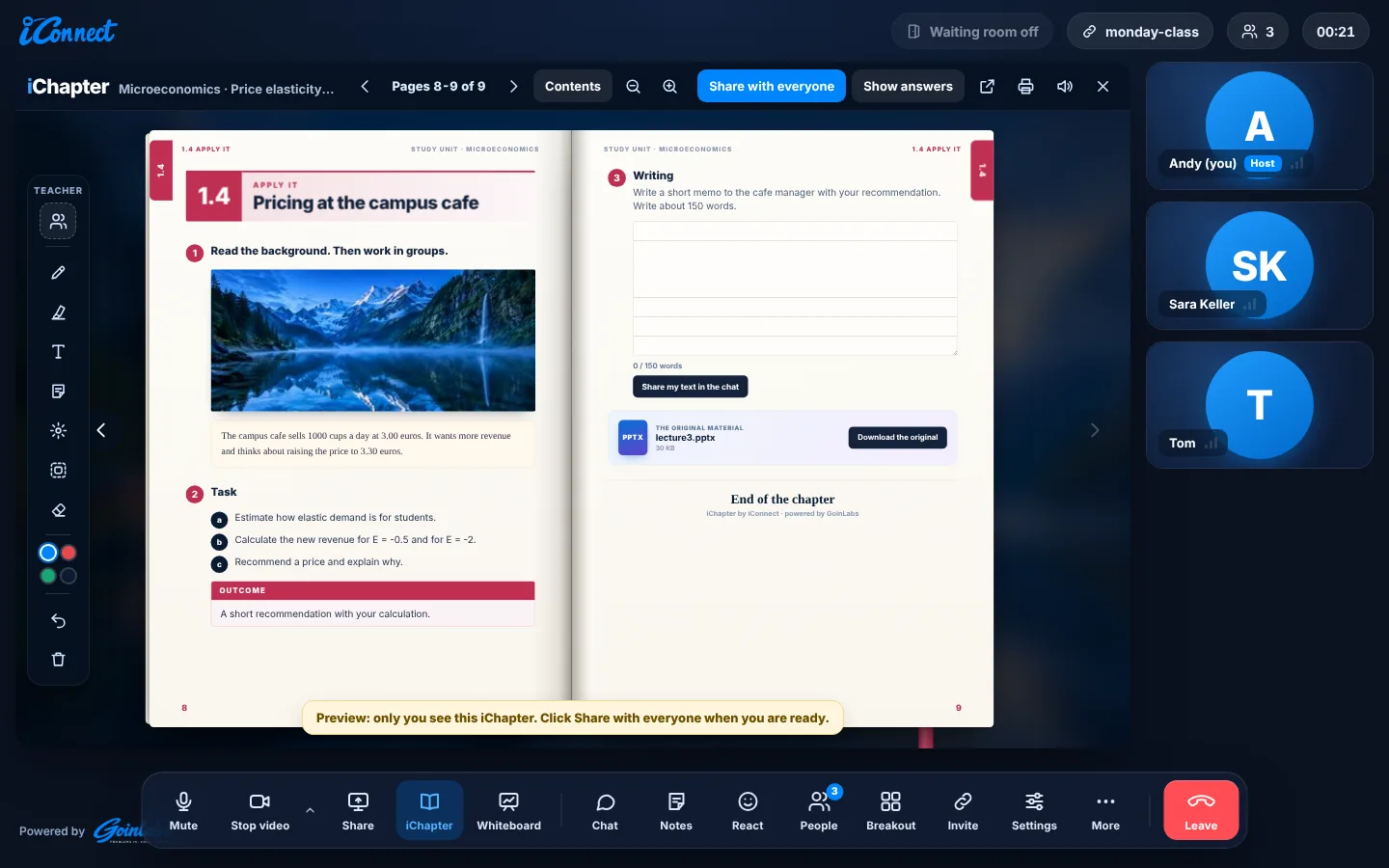
In the iChapter window, choose “From my material” and upload your file. The AI builds a complete study unit in about a minute.

  • The material, key terms, a self-test with model answers, and a case and writing task
  • For Bachelor, Master, Doctoral, professional training, upper secondary and adult learners
  • Everything comes only from your file. Students can download the original, unless you turn it off
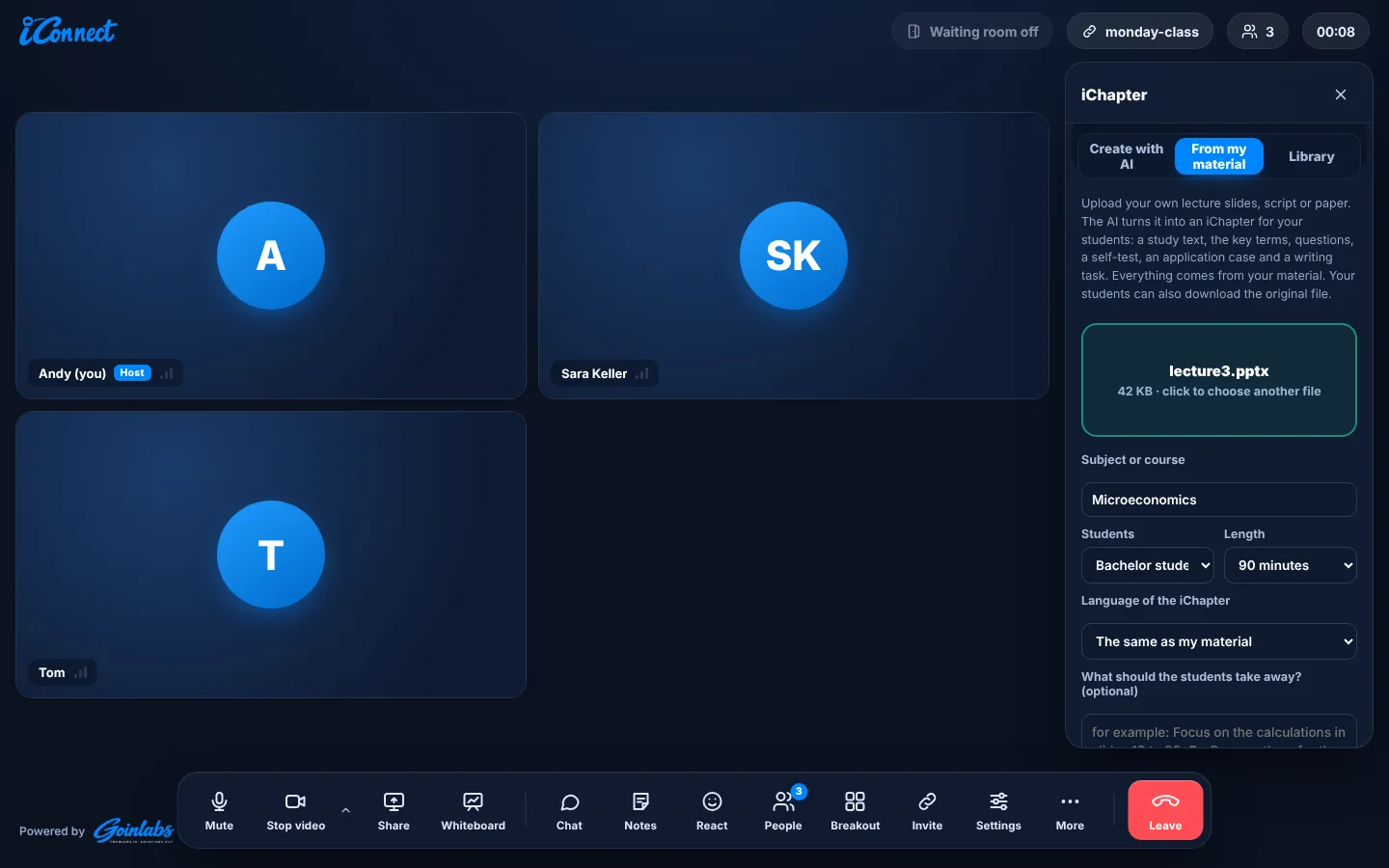
Upload slides, a script or a paper
The end of the chapter, with the original file to download
Click to enlarge
Ask the material

Your slides answer back.

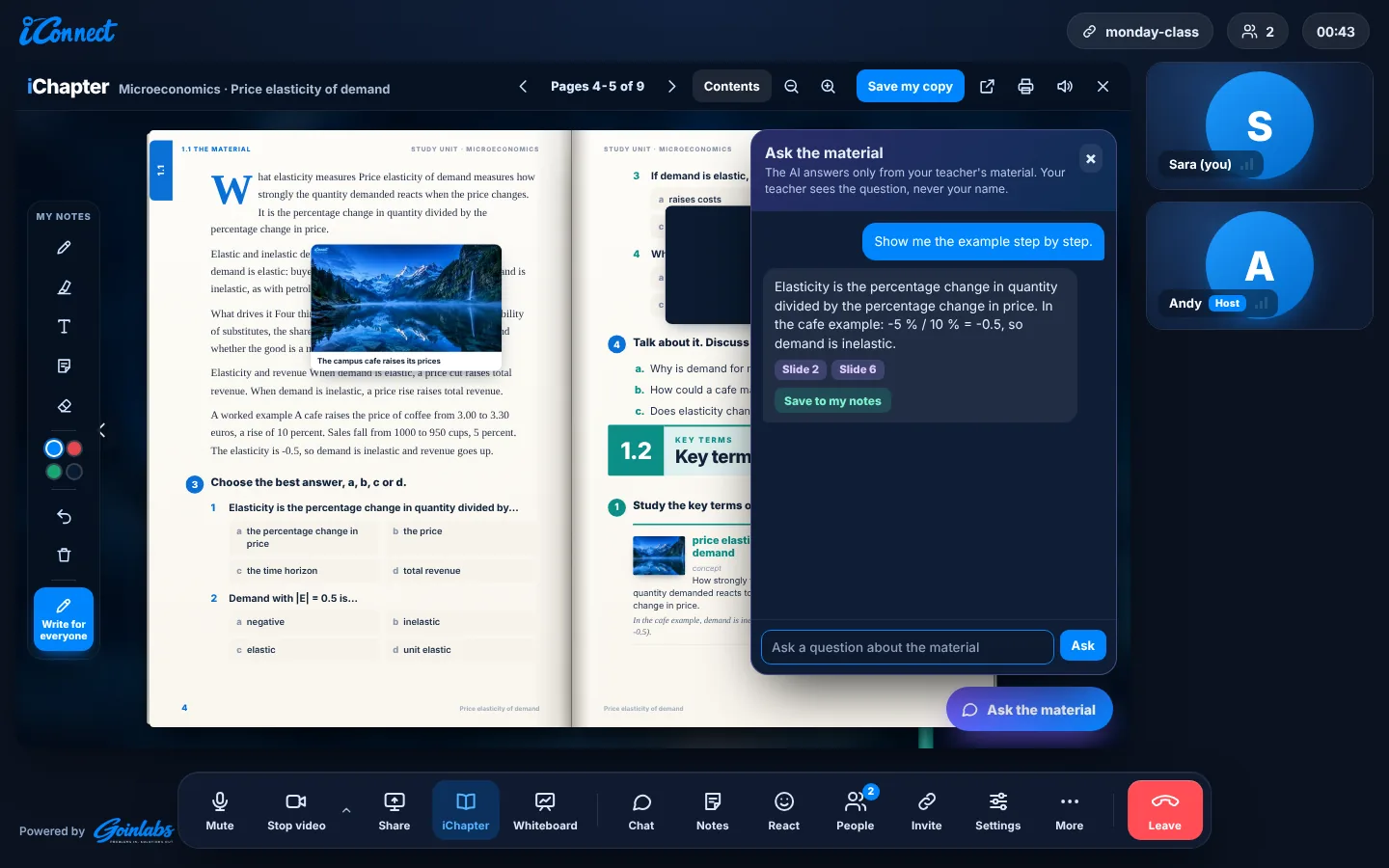
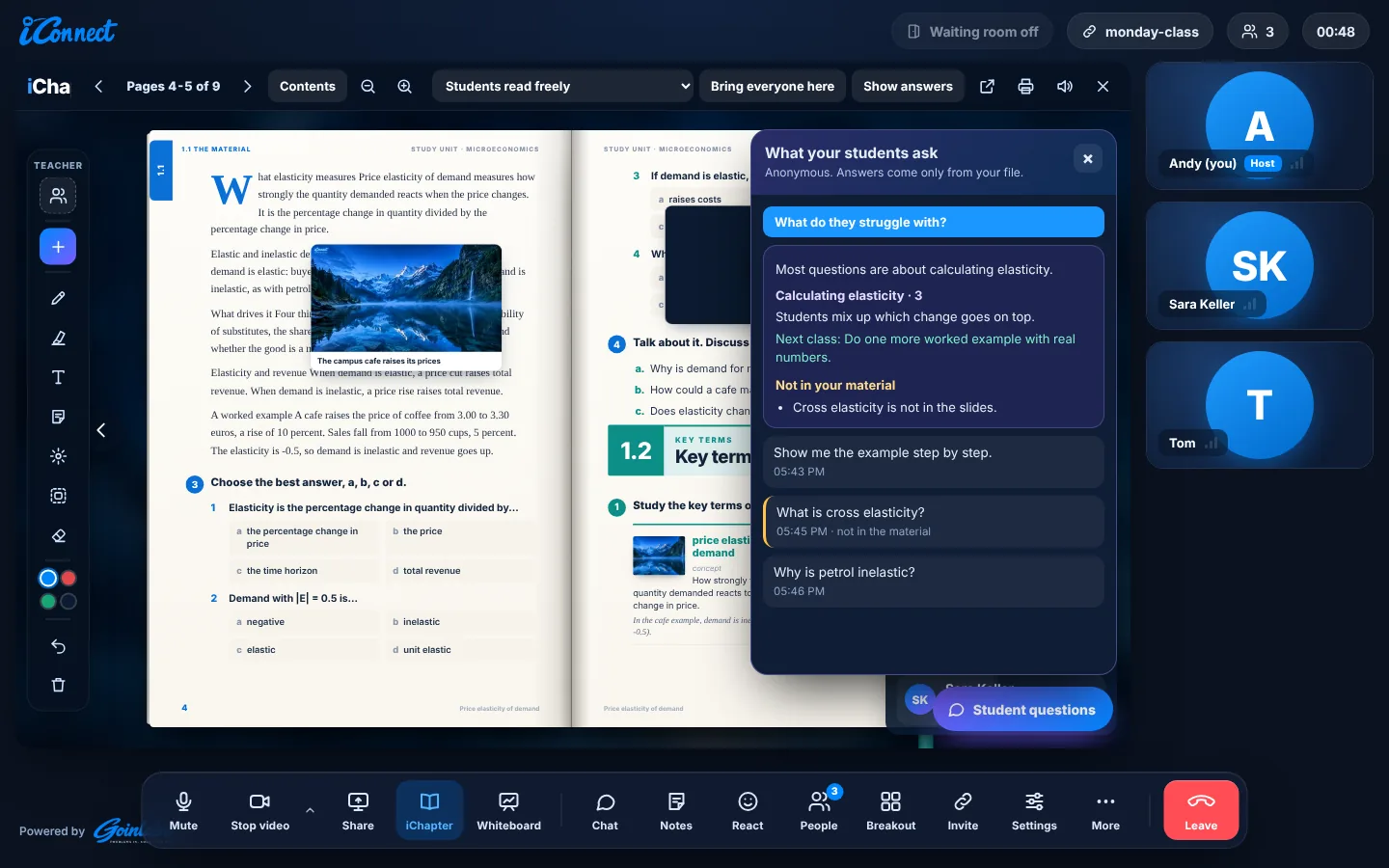
Students ask questions about the lecture. The AI answers only from your file and shows the slide or page. If the answer is not in the file, it says so.

  • Anonymous: you see every question, never who asked
  • “What do they struggle with?” groups the questions into themes and suggests one idea for the next class
  • It lists the questions your material could not answer
A student asks, the answer shows the slides it comes from
Your view: what the class struggles with
Click to enlarge
Live quiz

Know who is lost, while you still teach.

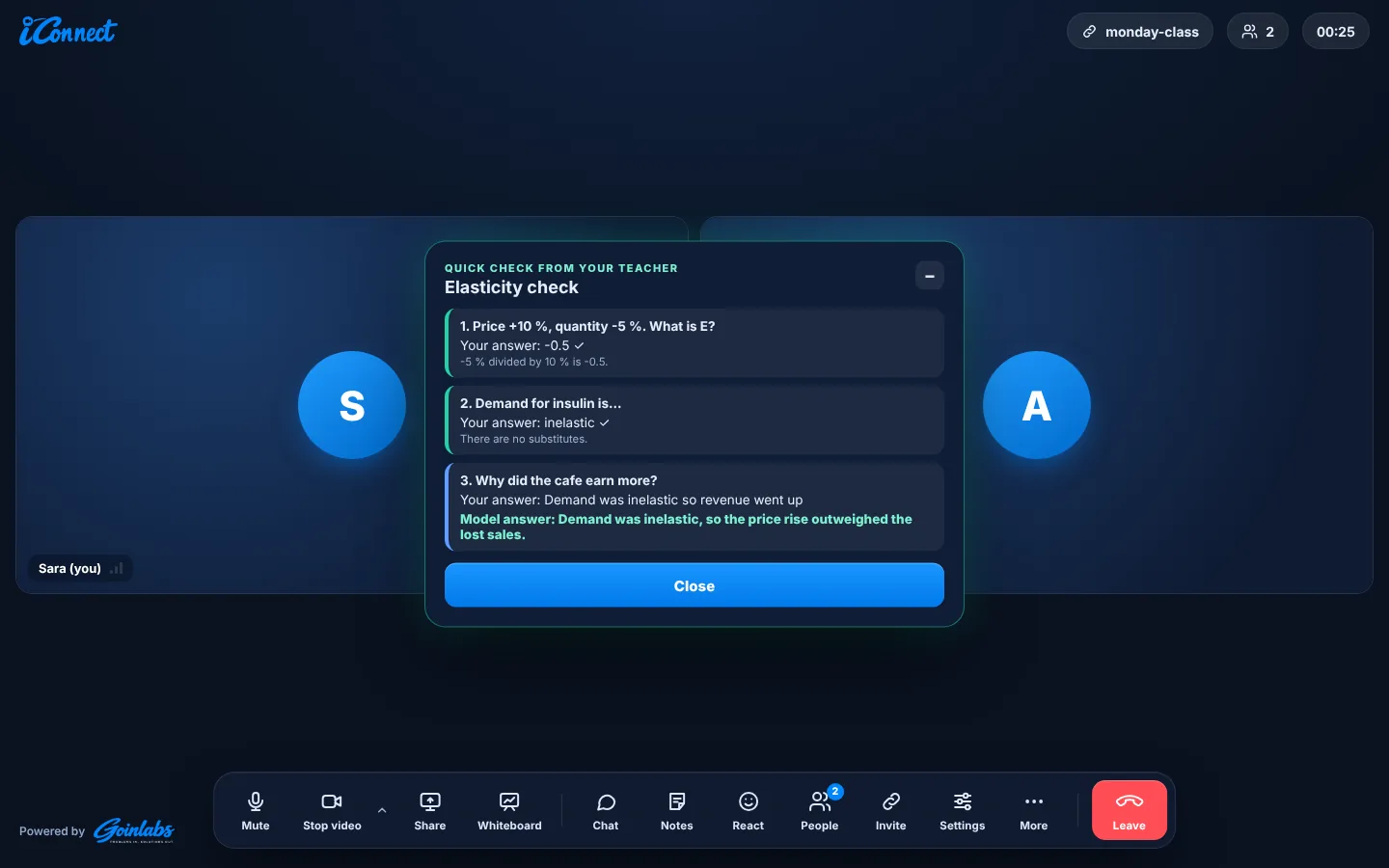
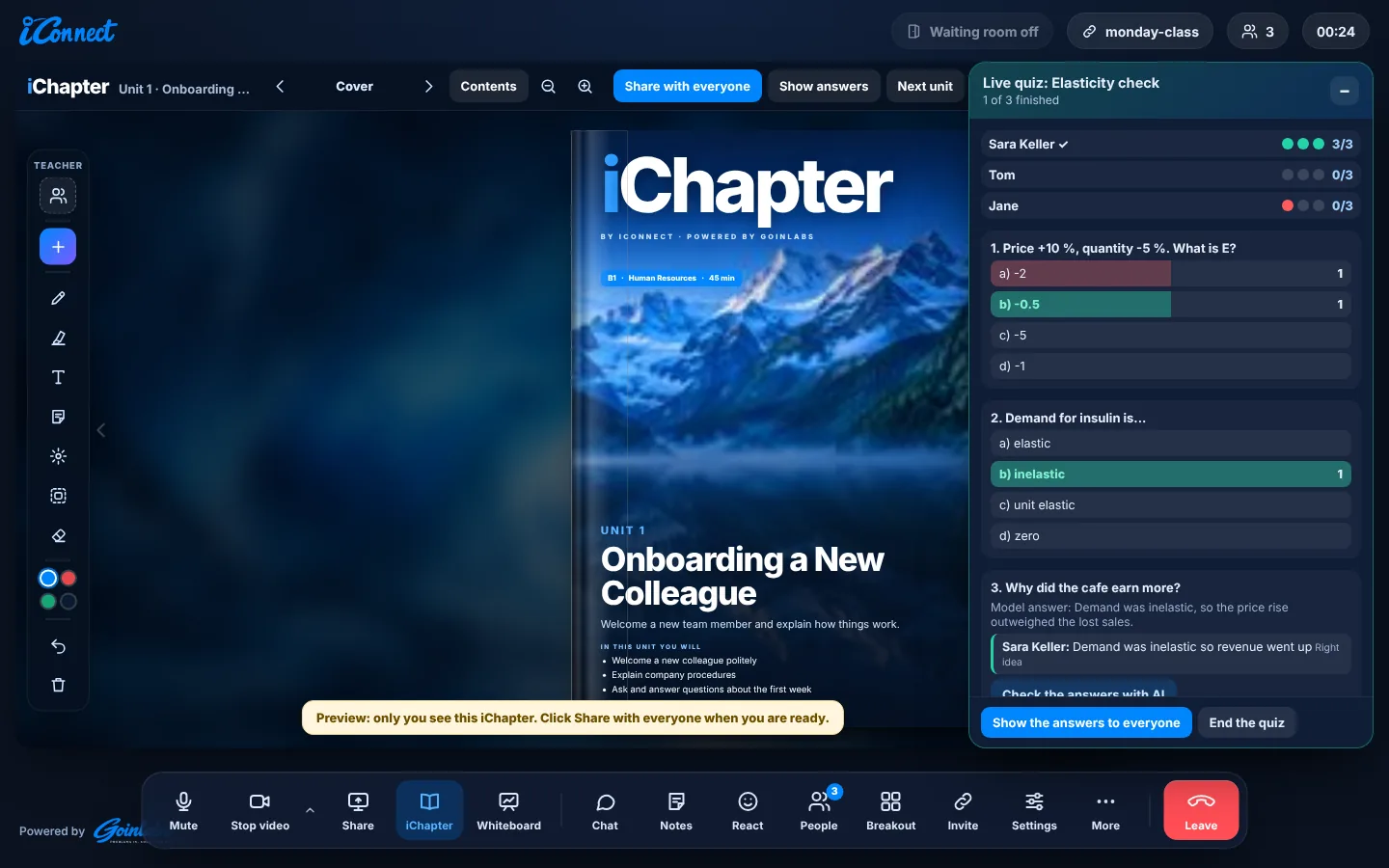
The AI writes 3, 5 or 8 questions from the chapter. You check them, send them, and they pop up on every student’s screen.

  • Your board shows each student, one dot per question, and how the class answered
  • Open answers can be checked by AI with one click
  • The right answers reach students only when you show them
The question on a student’s screen
Your live board, one dot per question
Answers and model answers, shown when you decide
Click to enlarge
Your toolbox

A picture or a video, right in the book.

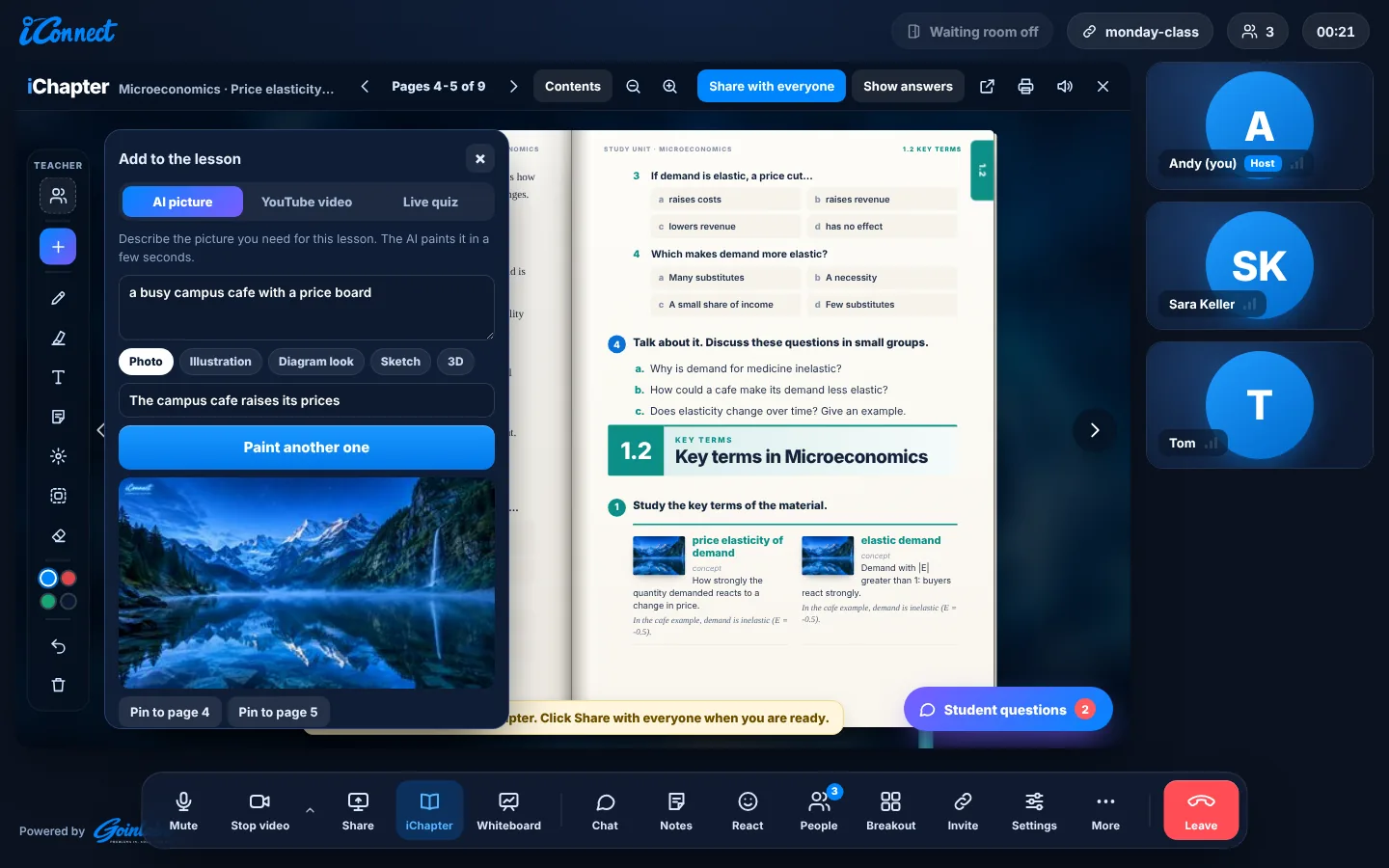
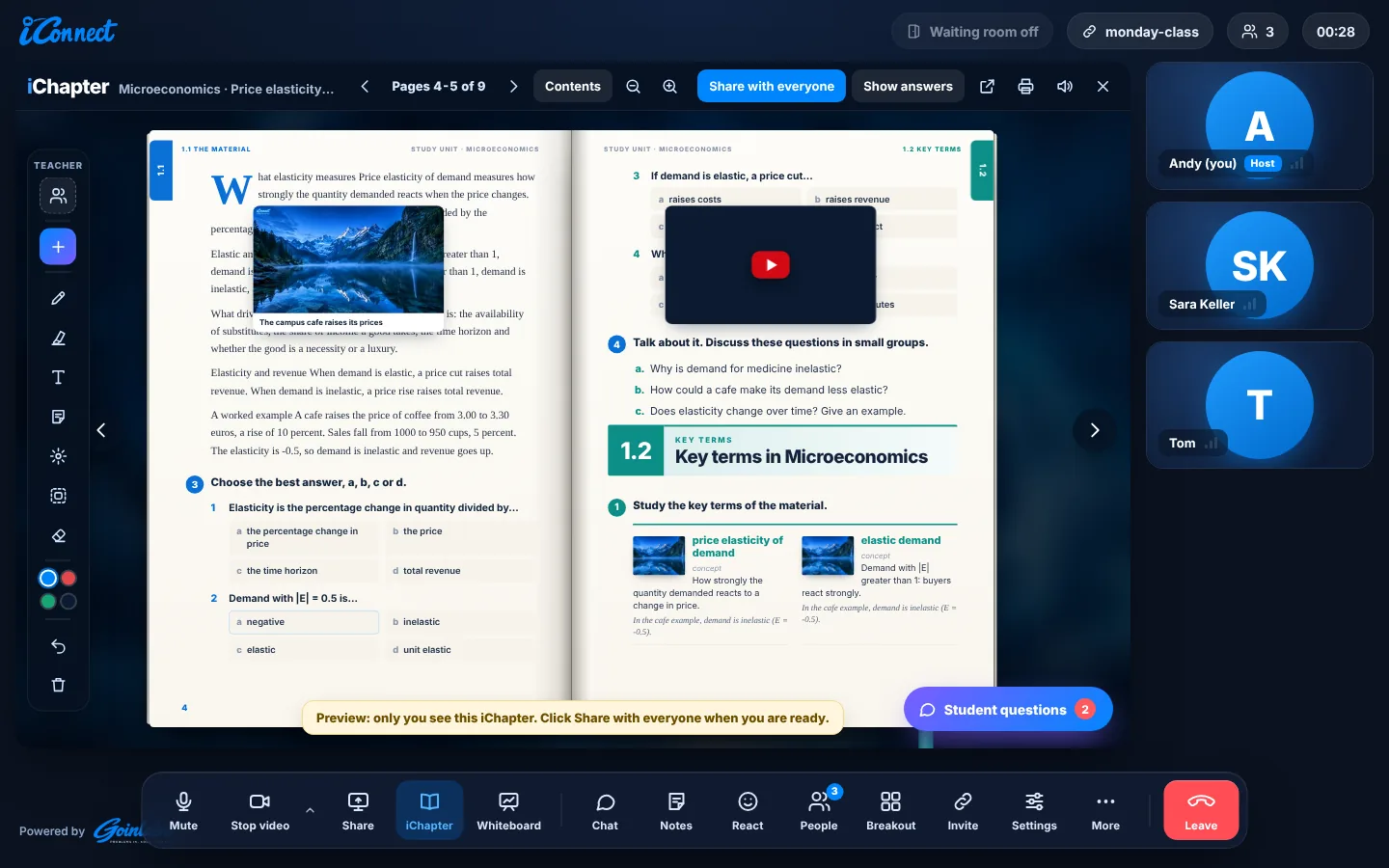
One “+” button adds an AI picture or a YouTube video to the lesson. Show it big to everyone or pin it onto a page.

  • AI pictures in different styles: photo, illustration, diagram look, sketch or 3D
  • YouTube plays in sync for the whole class
  • Pin a picture or video onto any page of the book
Describe the picture you need, the AI paints it
A picture and a video pinned onto the page
Click to enlarge
Backgrounds

Teach from a lecture hall, wherever you are.

New virtual backgrounds with the iConnect logo: lecture hall, seminar room, science lab, boardroom and seven more.

  • Lecture hall, seminar room, science lab, boardroom, city at dusk and home office
  • Plant wall, studio night, rooftop, bright room and blue waves
  • The background engine keeps your hair and edges clean when you move
Lecture hall
Lecture hall
Seminar room
Seminar room
Science lab
Science lab
Boardroom
Boardroom
Click to enlarge

“Your slides answer back, and you find out what your students didn’t get, before the exam.”

New backgrounds

Eleven rooms, all with your iConnect logo.

Built for universities

Your material, your control.

Read in the browser

Your file is read in the browser. Only its text goes to the AI.

Only your material

The AI is told to use only your material and to say when something is not in it.

Anonymous questions

You see what students ask, never who asked.

Answers stay with you

Quiz answers stay on your side until you show them, and your chapters are never added to the shared library.

Also in iConnect

Everything else your class needs.

Highlight to translate, 25 languagesMy notes with a takeaways PDFWhisper, a private talkWhiteboard with live pointerPage modes for the bookBreakout roomsWaiting roomRecording for the hostGoogle CalendarInvitations with Yes, Maybe and NoApps for Windows, Mac and Android

See every feature

Start small

Try it, pilot it, then grow.

1

Try

Open iconnect.goinlabs.com and start a class. No installation, no account for students.

Try iConnect free
2

Pilot

Run one lecture series with your own slides. We set it up with you.

Plan a pilot
3

Grow

Licences for your department, your faculty or the whole university.

Ask for an offer
New in iConnect 3.40

One room, one book, everyone on the same page.

01

Shared book

Drop any PDF and it becomes a book everyone sees at once. Draw, comment, edit text and add text boxes together.

02

Live view

See who is on which page or exercise and who is typing, right while the group works. Progress only, never answers.

03

Open question

Ask the whole room one question. The answers reach only you, with a short AI summary of what people think and what needs clearing up.

Editions and prices

Pick your plan. Start in two minutes.

Secure checkout by Stripe. Your licence key appears right after payment, and you can cancel any time.

For teachers

Teacher

1 teacher
€9.99per month€99per year
incl. 19% VAT
  • Education edition, no time limit
  • iChapter AI lesson book and 252 ready units
  • Whisper, English coach, worksheets and breakout rooms

School

10 teachers
€790per year€790per year
incl. 19% VAT
  • Everything in Teacher
  • For a whole team of teachers
  • One payment a year
With AI assistant

Business

1 user
€12.99per month€129per year
incl. 19% VAT
  • Business edition, no time limit
  • Your AI assistant joins meetings for you
  • Chat history and recap movie

Business Team

10 users
€1,090per year€1,090per year
incl. 19% VAT
  • Everything in Business
  • For a whole team
  • About €9.08 per user a month
Just trying it out?iConnect is free for meetings up to 15 minutes, in any browser, with no account.
Start free
A whole faculty or university?We make you an offer for your department, faculty or university, with setup and onboarding.
Ask for an offer

Stripe Card, PayPal, Apple Pay, Google Pay or SEPA. Learners and guests never need a licence, only the host does.

Need an invoice or a free trial? Talk to us

FAQ

Questions from professors

Which files can I upload?

PDF, PowerPoint (.pptx, speaker notes included) and Word (.docx).

Does the AI invent things?

It is told to answer only from your material. If the answer is not in your file, it says so, and you see those questions in your overview.

Do I see who asked a question?

No. Questions are anonymous. You see every question, never who asked it.

Which levels does it support?

Bachelor, Master and Doctoral students, professional training, upper secondary school and adult learners, in the language you choose.

Can students download my original file?

Yes, with a button at the end of the chapter. You can turn this off.

Do my chapters end up in a shared library?

No. Chapters made from your material stay with you and are never added to the shared iChapter library.

Do students need to install anything?

No. iConnect runs in any browser. There are also apps for Windows, Mac and Android.

Bring one lecture. We’ll show you the rest.

Send us a set of slides and we run a pilot class with you. Write to Andrew Yarahmadi at info@goinlabs.com or use the contact form.